
The Claude Code memory stack that survives /compact
Four layers (CLAUDE.md, MEMORY.md, PreCompact hook, synthesis archive) that compound instead of resetting. Each survives `/compact` and carries decisions, corrections, and preferences across sessions.

TL;DR: Every session I re-pasted the same brief, the same preferences, the same corrections. Claude read them fresh every time. I was paying to rebuild memory I already owned. This is the stack that ends that.
NOTE - For your Claude-Code Agent
Checkout the direct installer for your Claude-Code Agent - “The Claude Code Evolving Memory Stack”
At the bottom of this Article, you will find…
2 Agent Instructions from my Process
All my Agent Page Links for You
What happened with me…
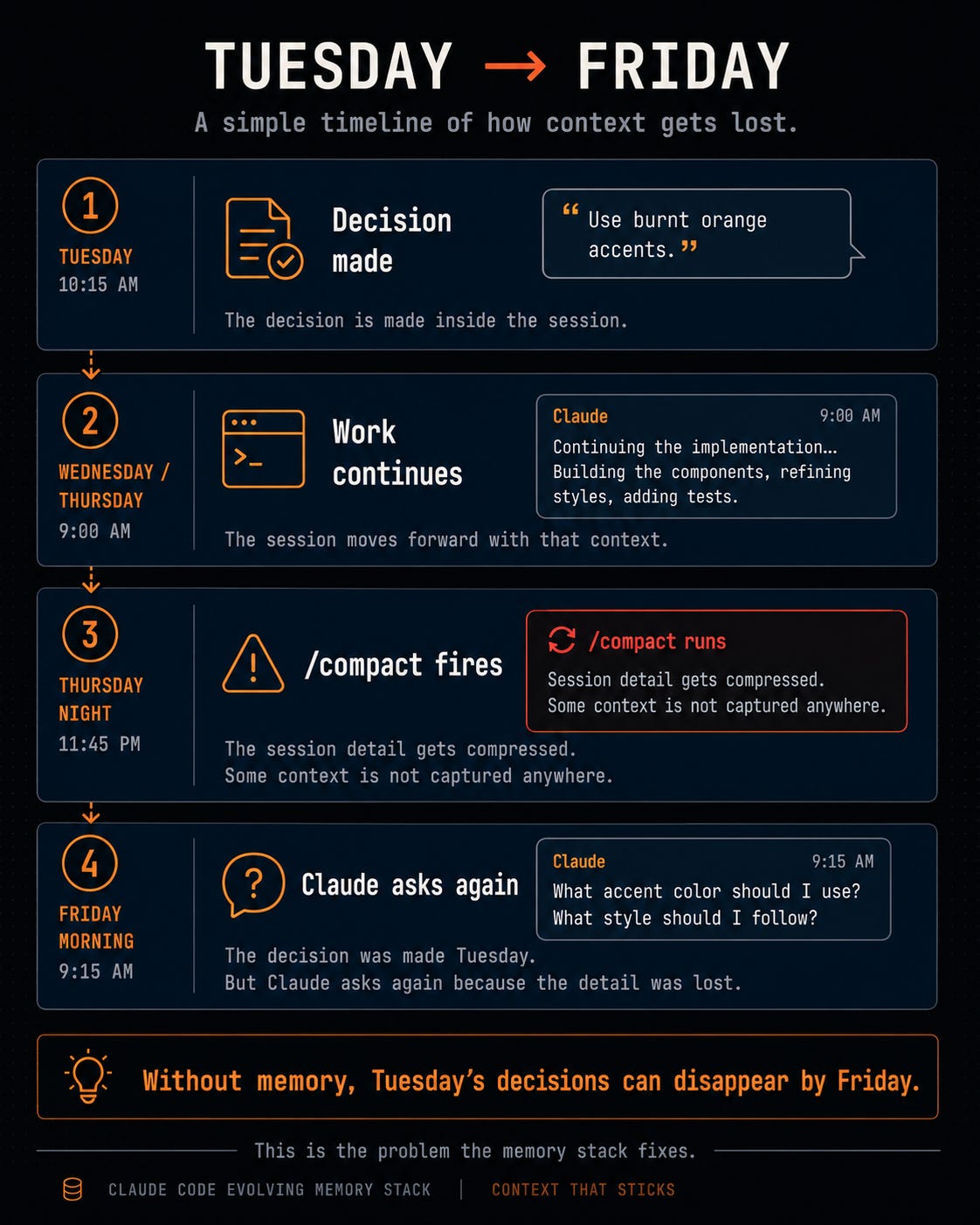
Tuesday I told Claude to use Postgres for the new service.
Wednesday it stuck. Thursday /compact fired. Friday, fresh session, it asked me which database we’d picked.
The decision was real. It just lived in session history. /compact swallowed it.
So I stopped letting one fragile log carry every decision I’ve ever made.
What Claude Code already gives you, and what it doesn’t
Claude Code already ships with memory primitives. It reads CLAUDE.md on every session start. It supports /compact so long sessions don’t blow past the context window. It lets you register hooks via settings.json. That handles the standing-rules layer.
What it doesn’t handle is anything that builds up inside a session.
Every decision you make mid-session, every correction, every preference you teach Claude lives in session history. When /compact fires (around 83.5% context by default), the summary keeps the gist and loses the specifics. The exact fix from yesterday and the workaround for that staging bug can vanish.
The stack below doesn’t replace what Claude Code already does. It fills in the gap.
A decision file that survives every reset. A daily session-state file that bridges restarts. A hook that grabs session detail before /compact wipes it. A searchable archive that makes cross-session patterns findable later.
Built on top of the primitives Claude Code already gives you. So the stack compounds instead of resetting every session.
The cost
Long Claude Code sessions get expensive because every turn carries old context. Commands, errors, file reads, decisions, corrections. It all rides along.
Here’s what that actually looks like. You paste a briefing at the start of every session. You re-explain your preferred output format. You correct the same mistake twice. Then the session gets too long and /compact fires.
/compact is Claude Code’s built-in compression tool. When a session hits a length threshold it kicks in and compresses full session history into a shorter summary so Claude can keep responding without hitting the context limit. That saves tokens.
But it creates a new problem. Claude keeps the gist and loses the details. The exact fix you found yesterday, the preference you repeated twice, the thing you said not to do again can disappear.
The fix isn’t “avoid /compact.” The fix is to stop letting session history be the only place Claude stores what it knows.
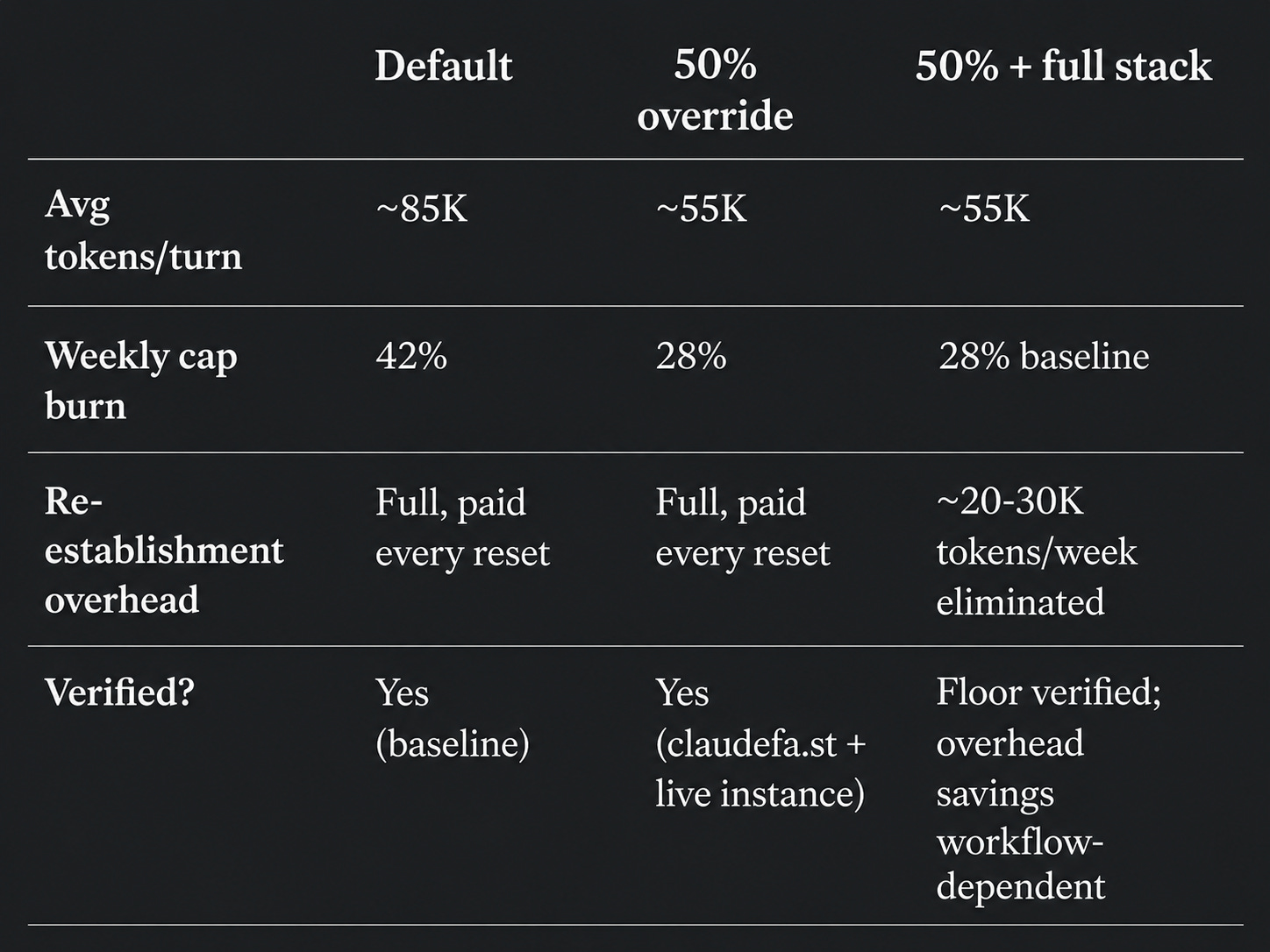
At the default settings, an average Claude Code session uses ~85K input tokens per turn. One env var (in EXECUTE below) cuts that to ~55K. The memory layers kill re-establishment overhead on top of that.
Works in Claude Projects (browser) too. Skip Step 1’s env var. The rest still applies.
THINK: Run a memory cost audit first
Before you build anything, find out what’s missing.
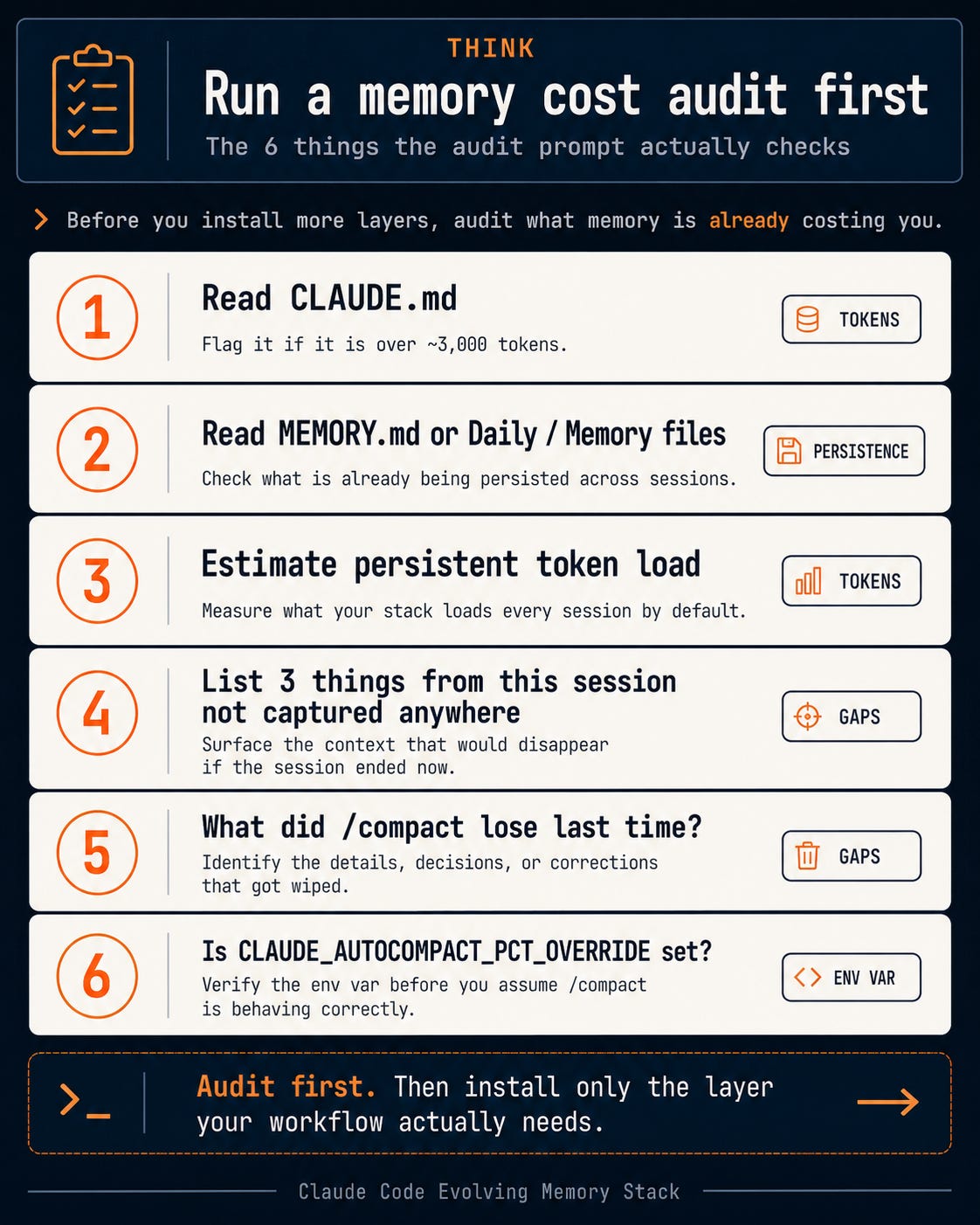
Paste this in your Claude Code session. It’s a diagnostic, not a task. The point isn’t to fix anything yet. The point is to see how much you’re rebuilding from scratch every turn.
You are running a memory cost audit. Not a task. Do not propose fixes yet.

FIRST — detect environment: Claude Code (terminal) or Claude Projects (browser)?
If Claude Projects: complete items 1-4 only, skip 5-6, read your system prompt instead of CLAUDE.md.

1. Read my CLAUDE.md if it exists. Note "no CLAUDE.md found" if absent. If the file exceeds ~3,000 tokens, flag it: "CLAUDE.md is a significant token load — may offset threshold override savings."
2. Read my MEMORY.md or any Daily/Memory files. If none exist, note "no persistent memory found."
3. Estimate total tokens these files consume on load. If files are absent, flag as a gap — you're rebuilding context from scratch every turn.
4. List up to 3 things I've mentioned in this conversation that aren't captured anywhere persistent.
5. [Claude Code only] What did I have to re-explain after the last /compact?
6. [Claude Code only] Run: echo $CLAUDE_AUTOCOMPACT_PCT_OVERRIDE. If not set: "Not set — default threshold applies (~83.5% of context window)."

Output: numbered list, one finding per point. No recommendations yet.
If the audit returns nothing in steps 1 and 2, you’re starting from zero. Every session you rebuild from scratch. That’s the gap this stack fills.
Sample output from the audit:
CLAUDE.md found, ~3,200 tokens
MEMORY.md found, ~1,800 tokens. No Daily/Memory folder.
Total persistent load: ~5,000 tokens per session
Re-explained in this session: “don’t auto-push to git main,” “use kebab-case for file names,” “check wiki before creating new docs”
Last compact lost: the decision to use Postgres over SQLite for the new service
CLAUDE_AUTOCOMPACT_PCT_OVERRIDE: not set
Three items in point 4 means three MEMORY.md entries waiting to be written.
Once you’ve seen the audit, run this:
Ask: Read my CLAUDE.md and any MEMORY.md files. List everything I’ve had to re-explain across sessions that isn’t captured anywhere persistent. Score each: how many times did I re-explain this in the last 2 weeks?
That ranked list is your MEMORY.md seed. Most people find the same two or three things showing up every week. That isn’t a prompting problem. It’s structural.
The architecture
Hooks in Claude Code are scripts you register in settings.json that run at specific moments. The PreCompact hook runs the instant before /compact fires. That tiny window is where you save what’s about to get compressed.
The env var cuts the cost. The rest of the stack stops you from paying it twice.
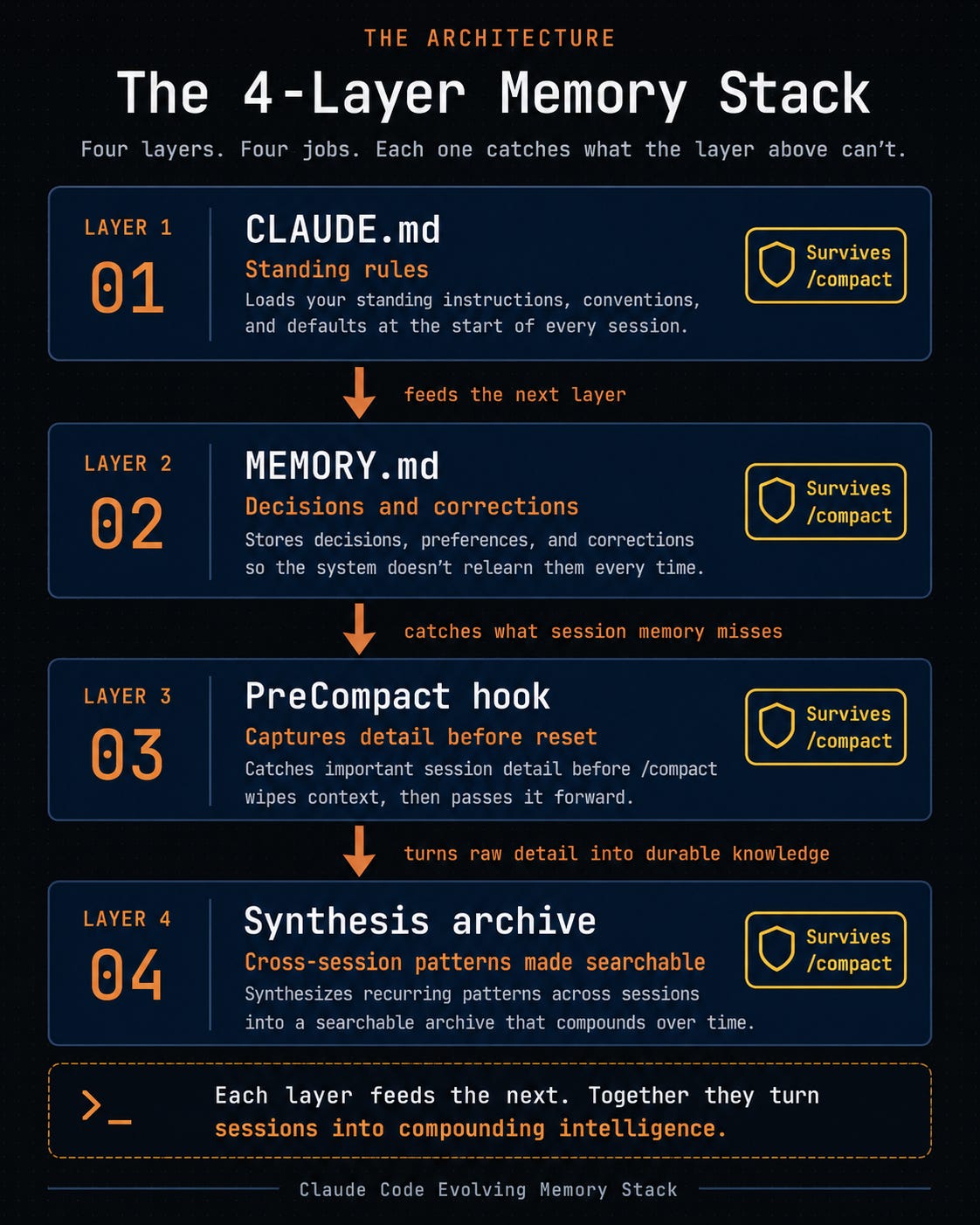
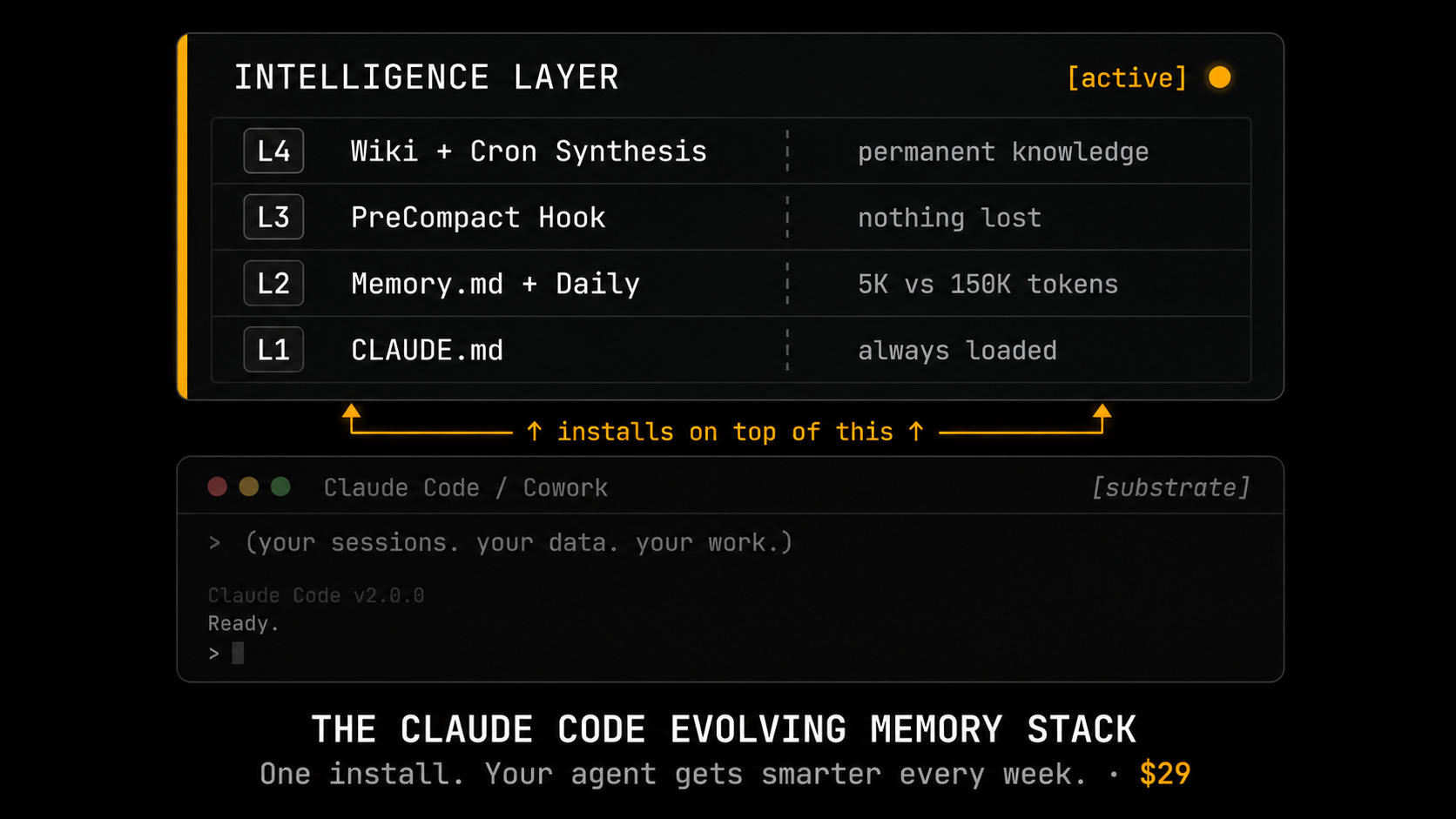
Four layers, four different jobs.
The env var drops per-turn cost from ~85K to ~55K tokens. One line in
.zshrcand a shell restart.CLAUDE.md holds the standing rules. Conventions and project facts Claude shouldn’t have to re-learn every session.
MEMORY.md and Daily/Memory hold the decisions. Tuesday’s call shows up on Friday without me re-explaining anything.
The PreCompact hook and the synthesis archive catch the detail before
/compactwipes it. Then they make those patterns searchable later.
Each layer feeds the next. After 14 days on a $5 Hetzner server, my sessions start with Claude already knowing my architectural constraints and the workaround from last Tuesday. The session doesn’t pause to ask.
The table below splits the persistent layer into project MEMORY.md and global MEMORY.md. Same idea, finer breakdown for install:
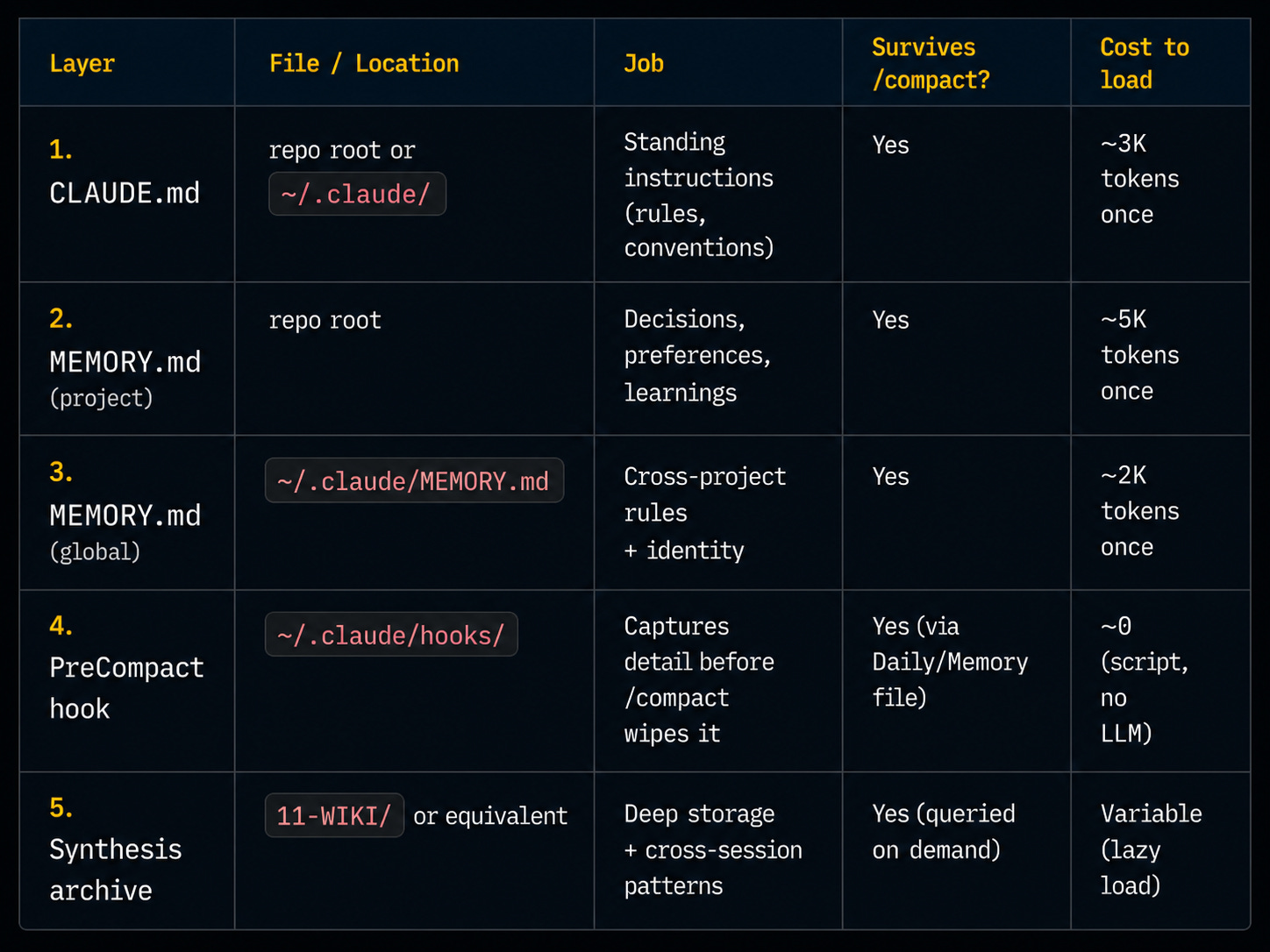
Multi-client work? Global ~/.claude/MEMORY.md carries identity and cross-client rules. Per-project MEMORY.md carries the client’s specific decisions. Switching clients is a project switch. Same global, different project layer.
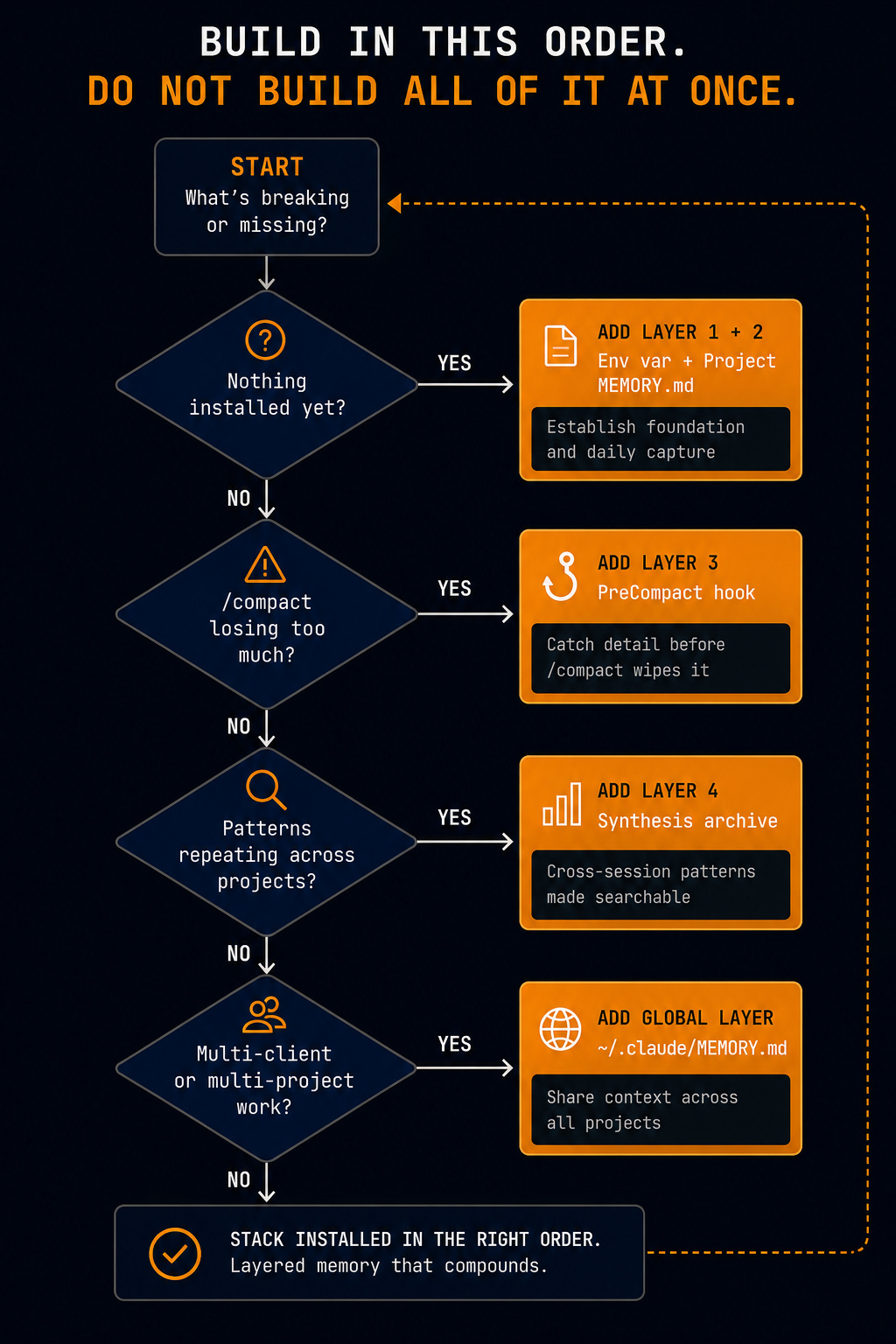
Build in this order. Don’t ship all of it at once.
Start with the env var and project MEMORY.md if you have nothing.
Add the PreCompact hook when
/compactloses too much.Add the synthesis archive when patterns repeat across projects.
Before you install anything, run this:
“Here is my workflow: [describe what I use Claude Code for in 3-4 sentences]. I want to use CLAUDE.md, MEMORY.md, daily memory, a PreCompact hook, and a synthesis archive. Where will this setup break for my workflow? Pick the one layer most likely to fail and explain what I should change before I install it.”
The weak point is different for every workflow. Find it before you build it.
EXECUTE: Claude Code memory stack setup
Step 1. Cut per-turn input tokens by 35%
Add this to the shell that launches Claude Code:
export CLAUDE_AUTOCOMPACT_PCT_OVERRIDE=50
Add to .bashrc / .zshrc / start.sh. /compact now fires at 50% of context window instead of ~83.5%. Result: 85K to 55K avg input tokens per turn.
The 35% average reduction is measured against the ~83.5% default threshold, confirmed against claudefa.st context-buffer-management docs and verified in a live session on 2026-05-14. (claudefa.st is an unofficial Claude Code performance tracking resource, not an Anthropic property.) Your number will vary by session length.
Verify it worked.
Open a new shell after adding this to your startup script. Run echo $CLAUDE_AUTOCOMPACT_PCT_OVERRIDE. It should return 50. If it returns nothing, the variable isn’t loading. Check your shell startup file.
Step 2. Register the PreCompact hook
Add to ~/.claude/settings.json:
{
  "hooks": {
    "PreCompact": [
      {
        "matcher": "",
        "hooks": [
          {
            "type": "command",
            "command": "bash ~/.claude/hooks/precompact-extract.sh"
          }
        ]
      }
    ]
  }
}
Step 3. Install the Phase 1 extractor
#!/bin/bash
# Phase 1: file I/O only — no LLM calls
# Saves last 300 lines before /compact fires
PENDING_DIR="$HOME/.claude/precompact-pending"
mkdir -p "$PENDING_DIR"
JSONL_PATH=$(ls -t "$HOME/.claude/projects/"*"/"*.jsonl 2>/dev/null | head -1)
if [ -n "$JSONL_PATH" ]; then
    tail -300 "$JSONL_PATH" > "$PENDING_DIR/buffer-$(date +%Y%m%d-%H%M%S).jsonl"
    touch "$PENDING_DIR/pending-extraction"
fi
exit 0
No LLM calls in Phase 1. A PreCompact hook that calls a model runs at peak context, exactly when you have the least headroom. It would eat into what it’s trying to save.
Phase 1 saves raw bytes to disk. Phase 2 runs LLM extraction after /compact has already fired and the context window is fresh.
The sequence: /compact fires, Phase 1 saves the last 300 lines, Phase 2 runs on your next interactive turn using a Haiku sub-agent.
Haiku specifically because Phase 2 runs in parallel with my main session. A sub-agent doesn’t block what I’m doing. A simple grep/awk parse would miss semantic decisions. Haiku reads the buffer, classifies the keepers, writes the entry, exits.
Phase 2 takes the raw buffer and pulls the decisions, corrections, and preferences worth keeping into your Daily/Memory folder.
Browser users (Claude Projects):
If you’re in the browser, the layer that matters most is MEMORY.md inside Claude Projects’ custom instructions. Paste your decisions, preferences, and corrections there. /compact isn’t relevant. The synthesis archive works the same way. You just maintain it manually.
On CLAUDE.md bloat:
Keep it under ~3,000 tokens. What goes: long examples, verbose comments, anything you can find in the repo by searching. What stays: rules, conventions, key project facts that don’t live anywhere else. The audit prompt above flags when you’ve crossed the threshold.
After your next /compact fires (you’ll see a notification in the session), watch what Claude does. Does it keep moving with the context you had before, or does it ask you something you already answered?
If it asks, your memory isn't evolving. It's resetting.
Free companion tools (while you decide on the bundle)
If $29 isn’t where you are right now, three free drops pair cleanly with the stack you just built. Same operator brain behind all of them. Use them in the meantime.
GTM AI Knowledge Builder Kit →
The knowledge files you load into Claude when you want it to think like a GTM operator instead of a generic assistant.Context Stack →
The context architecture that sits underneath every prompt I run. Pairs directly with the CLAUDE.md and MEMORY.md layers above.Content Pillar System →
How I run the synthesis archive on the content side. Same memory stack, output channel.
Get the full stack
The env var gets you 35% per turn. That’s the floor.
The full 4-layer stack gets you ~65% weekly through the re-establishment overhead it kills on top of that. The difference: the env var reduces token cost per turn. The other layers stop you from rebuilding context you already paid for.
The bundle has all 14 files:
The PreCompact extractor script
The
settings.jsondrop-inThe startup wrapper with autocompact set
The Daily/Memory template
6 evolution prompts
The Sunday maintenance SOP
The troubleshooting playbook for when the hook doesn’t fire or Phase 2 gets stuck
Get the Claude Code Evolving Memory Stack, $29 →
$29 one-time. 7-day refund if the 35% reduction doesn’t show up in your next compact cycle.
Two Prompts from the Full Stack
Prompt 1 — Token Audit
When to use: Before setting up the memory stack. Measures your current token load, identifies what corrections and preferences aren’t captured, and gives you a baseline to compare against after setup.
Input: None. Just paste and run.
Output: A 6-point numbered list (or 4-point if you’re on Claude Projects). Specific gaps, not generic advice.
Example output line:3. Estimated 12K tokens loading from CLAUDE.md + MEMORY.md. No Daily/Memory files found — session context rebuilt from scratch each turn.
Prompt:
ROLE: You are a memory systems auditor. Your job is to measure the current token cost and persistence gaps in this AI session — not to fix anything yet.

CONTEXT: Claude Code sessions accumulate persistent memory across four layers: CLAUDE.md (behavioral rules), MEMORY.md (standing decisions/preferences), Daily/Memory files (session carry-over), and an optional wiki. This audit establishes a baseline before setup — or tracks drift over time.

THINK BEFORE ACTING:
1. State the 3-5 most relevant facts you have: environment (Claude Code vs browser), what files you can see, whether any session history is accessible.
2. Identify any gaps: what files are missing, what you can't determine without more info.
3. Decide: can you complete the full 6-point audit, or will some items be "not applicable"?
4. Proceed item by item, stating your finding for each before moving to the next.

STOP AND ASK if any of the following are true:
- You cannot determine whether you're in Claude Code or a browser environment — ask: "Are you running Claude Code (terminal) or Claude Projects (browser)?"
- You find a CLAUDE.md but cannot read it — ask where it is before marking it missing.
(If this is a fresh session with no files and no history, proceed — zero gaps on first run is valid data, not an error.)

TASK: Run a structured 6-point audit. Findings only. No recommendations, no fixes.

FIRST — detect environment:
- Claude Code (terminal access, file system available): complete all 6 items
- Claude Projects (browser/API, no terminal): complete items 1-4 only; skip 5-6; for item 1, read the Project system prompt instead of CLAUDE.md

---

1. Read CLAUDE.md if it exists. If missing: note "no CLAUDE.md found" and continue.
   Flag if over 10K tokens: "CLAUDE.md is a significant token load — at 50% threshold, a CLAUDE.md over ~40K tokens consumes most of your working context before the session starts. Target under 10K."
   OUTLIER — if no CLAUDE.md exists yet: note "no CLAUDE.md found — this is the first thing to create after this audit."
   OUTLIER — if this is a brand new session with no history: report that; zero gaps is expected and valid.

2. Read MEMORY.md and any files in a Daily/Memory folder. If none exist: note "no persistent memory files found — session context rebuilds from scratch every turn."

3. Estimate total tokens consumed by files found in items 1-2. If absent, estimate 0 and flag: "Loading 0 persistent memory — all context is ephemeral."

4. List up to 3 things mentioned in this conversation (corrections, preferences, decisions) that aren't captured anywhere persistent. If this is your first audit, zero results is valid — value compounds on repeat runs.

5. [Claude Code only] What did I have to re-explain after the last /compact? If pre-compact history is inaccessible, say: "Pre-compact history inaccessible — the system you're setting up will prevent this going forward."
   OUTLIER — if the env var check below returns empty: flag it here too — the two issues compound.

6. [Claude Code only] Run: echo $CLAUDE_AUTOCOMPACT_PCT_OVERRIDE. Report the value exactly. If empty: "Not set — default threshold applies (~83.5% of context window). /compact fires late, after maximum token accumulation."
   OUTLIER — if the command errors or is unavailable: note "env var check not possible in this environment — confirm you're running Claude Code in a shell where the export was set."

OUTPUT FORMAT: Numbered list, 6 points (or 4 if Claude Projects). One finding per point. State what's missing and why if you lack data for a point — don't skip it.

EVALUATION CRITERIA: A useful result has at least 2 specific gaps identified, OR a clear "no gaps found" with evidence from the files. Do not soften a clean result — it's valid data.
Prompt 2 — Decision to Rule
When to use: After any session decision worth keeping — architecture choices, workflow commitments, tool selections, scope calls. Run this immediately after making the decision, not at the end of the session.
Input: The decision in 1-3 sentences. What was decided and why (if you stated a reason).
Output: A formatted MEMORY.md entry written to the right file. Conflict check before writing.
Example output:Added to /home/youruser/YourProject/MEMORY.md: - [2026-05-15] [Decision] — decided not to use streaming responses in the webhook handler. Reason: buffer timing caused dropped chunks under load. Next time: default to non-streaming for all webhook contexts unless explicitly tested.
Prompt:
ROLE: You are a memory persistence specialist. Your job is to convert a session decision into a durable MEMORY.md entry so it survives the next /compact.

CONTEXT: MEMORY.md is the standing-rules layer of the memory stack. It loads at the start of every session. Entries here must be specific enough to act on without re-explanation. Vague entries dilute the file and get ignored.

THINK BEFORE ACTING:
1. State what the decision is (as you understand it from the input) and whether it's specific enough to produce a concrete rule.
2. Identify which MEMORY.md file is the likely target (global or project-level) and why.
3. State whether you need clarification before proceeding, or whether you can write directly.
4. If proceeding: draft the entry format in your head before writing — confirm it will be specific enough to act on.

STOP AND ASK if any of the following are true:
- The decision as described is too vague to produce a concrete rule — ask: "What specifically triggered this decision?" One question only. Wait.
- You find multiple MEMORY.md files and aren't sure which is the target — ask: "This sounds [project-specific | cross-project]. Write to [project path] or ~/.claude/MEMORY.md?" One question only. Wait.
- The input describes a behavioral preference (how you want Claude to act), not a project decision — stop and say: "This is a preference, not a decision. Use Prompt 3 (Preference to File) instead."
(If the decision is clear and there's only one MEMORY.md, proceed directly — no need to ask.)

TASK: Capture the decision below into the correct MEMORY.md file.

The decision I want to capture: [describe the decision in 1-3 sentences]

PRE-WRITE CHECKS (run both before touching any file):

Check 1 — Is this specific enough?
OUTLIER — if the decision is too small to be a permanent rule (e.g., "used X approach for this one function"): note "This looks session-specific. Worth capturing in Daily/Memory instead of MEMORY.md — shall I write it there?" One question. Wait.
OUTLIER — if the decision would contradict an existing MEMORY.md entry: flag the conflict explicitly — "Existing entry: [quote]. This contradicts it. Update existing, keep both, or replace?" Wait for my call.

Check 2 — Which file is the target?
- One MEMORY.md: use it.
- Multiple MEMORY.md files across projects: ask before writing.

STEPS:
1. Read the target MEMORY.md. If it doesn't exist, create it with:
   # Persistent Memory
   Last updated: [today's date]

2. Scan existing entries for any that cover the same decision. If a conflict exists: "Existing entry covers this: [quote it]. Update it, keep both, or replace?" Do not silently overwrite — wait for my call.

3. If no conflict: write one entry in this format:
   - [YYYY-MM-DD] [Decision] — [What was decided]. [Why, if stated]. Next time: [what to do automatically without asking].

TEAM NOTE: If this is a shared Project with multiple users, prefix the entry with the contributor's name: "[Name — Decision] — ..." so teammates can identify whose decision this was.

OUTPUT FORMAT: Confirmation line — "Added to [file path]: [the entry you wrote]." If the decision applies across all future projects, add: "Consider moving to ~/.claude/MEMORY.md for cross-project coverage."
FAQ
Q: What is CLAUDE_AUTOCOMPACT_PCT_OVERRIDE and how do I set it?
An env var that controls when /compact fires. Add export CLAUDE_AUTOCOMPACT_PCT_OVERRIDE=50 to your .bashrc or .zshrc and restart your shell. Drops the trigger from ~83.5% to 50% of your context window. Cuts average input tokens per turn from ~85K to ~55K.
Q: How do I make Claude Code remember context between sessions?
Write decisions and preferences to MEMORY.md in your project folder or ~/.claude/. Claude Code reads it automatically on every session start. For session-level continuity, add dated entries to a Daily/Memory/ folder and install a PreCompact hook to capture context before it compacts out.
Q: Do I need all 5 layers to see results?
No. The env var in Step 1 cuts tokens by 35% on day one. MEMORY.md alone kills most re-establishment overhead. Build the env var and project MEMORY.md first. Then add the PreCompact hook. Global MEMORY.md and the synthesis archive come after the core is working.
More from me: My Brevv Agents library
The stack above handles memory. These agents handle the work that runs on top of it. Each one is hosted on Brevv, free to run, built for B2B operators who like to think out loud before they ship.
B2B Demand Gen and the 4C trust framework
Trust is the real conversion gate in B2B. These 8 prompts find the gap, name it, and turn it into a calendar you can ship from.
Copy and content
When the asset is the bottleneck, not the strategy.
Comment Engine (each one ships with a walkthrough video)
Comments still pull more qualified pipeline than most posts. These five run my full comment workflow end to end.
Solo and newsletter

Loved this post?
About me I’ve helped 150+ early-stage founders build GTM systems that generate real pipeline, not just activity. Before StartupGTM, I spent 10 years building go-to-market engines from scratch across B2B SaaS, community platforms, and sales tech — as both a founder and a fractional CMO. I write about using AI to do the parts of GTM that most founders either dread or get completely wrong.
Want a help or advise? Book a 30-min GTM Audit and Brainstorming Call
Other prompt systems that I’ve shared earlier:
AI Partners that tear your plan apart and speaks as your customer - Complete System Inside
[Content OS 1/4] Your Content is Invisible. Diagnose and Fix using this prompt system in 30 Seconds.
Reddit Problem Mining Prompt System: 0→1 Validation in Hours Not Months
The Founder’s Story Bank OS: 52 Repeatable Narratives for GTM, Leadership, Product & Hiring
Your Plan Will Fail - Unless You Invert These 18 Hidden Assumptions (Master Prompt Included)
Copy This LinkedIn Profile Upgrade Template (I used It to 8x my Profile Visibility)
If you’re not a subscriber, here’s what you missed earlier from my another newsletter:
The CXO Newsletter Playbook: Why 95% Fail (And the 5-Prompt Strategy System)- Part 1 of 2
Your Head of Growth Toolkit (with Context, Prompts and Agents)
Analyze your Content for Trust and Revenue Goals with Claude (using Content Trust System)
Build an ICP so specific your message gets reply - The Pressure Profile ICP System (with Prompts)
The AI Partner Stack: 8 Roles as My Advisory Board (Part 2 of 2)
Find trends before others: Frameworks, Techniques, Sources and Prompts
The Market Entry Timing Equation: When Being Early Wins and When It Kills You
The Viral LinkedIn GTM Playbook: Frameworks That Drove Engagement and Leads